
Lark Player:Music Player & MP3
Lark Player Studio - Music, MP3 & Video PlayerMusic & Audio
4.627.07K Reviews
- Version
- Varies With Device
- Installs
- 500.00M
- Age Rating
- Everyone
Screenshots
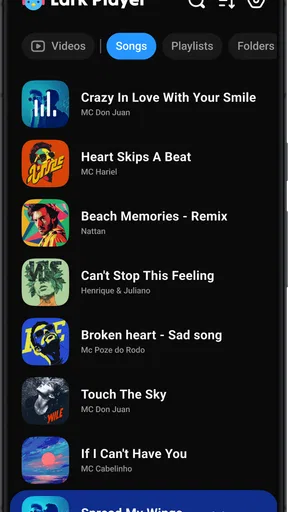
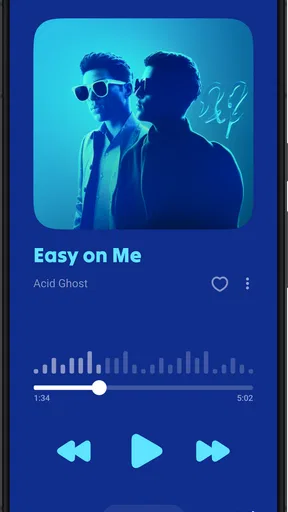
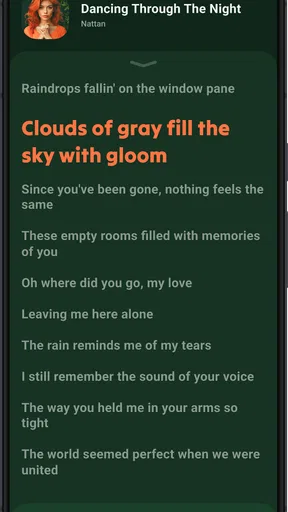
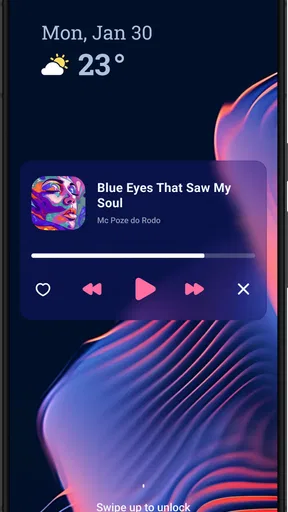
Our Review of Lark Player:Music Player & MP3
 Analysis by Appyee
I see Lark Player: Music Player & MP3 as a practical choice for people who keep music files on their phone and want more control than a bare-bones playback screen provides. Its appeal is less about replacing every music service and more about making a personal collection easier to browse, adjust and enjoy. If that is how you listen, the mix of playback tools and visual customization makes sense; if you mainly stream new releases, a dedicated streaming service may suit you better.
A player built around music you already have
Because this is an offline music player, its strongest everyday use is straightforward: open a collection stored on your device and play it without relying on a streaming session. That can be handy on a commute, during a workout, or somewhere you prefer not to use mobile data. It also gives listeners a familiar option for albums, mixes and individual tracks they have collected over time.
That offline focus is worth keeping in mind before installing it. A local player organizes and plays music available on the phone; it should not be mistaken for a subscription catalog where you search for virtually any artist and add new releases to a library. I would choose Lark Player for listening to files I already have, and reach for a streaming app when discovery and on-demand access to a large online catalog matter more.
Small adjustments that make listening easier
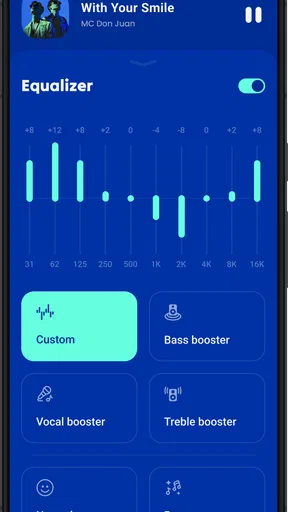
The equalizer is useful when one set of headphones makes a playlist sound too bass-heavy or a spoken track feels dull. Rather than changing the volume for every song, I’d make a modest adjustment for the listening setup and then leave it alone. A gentle change is usually more comfortable across a mixed playlist than an extreme preset that makes one track sound exciting and the next one harsh.
The practical trade-off is that sound controls cannot improve a poor source file or make every pair of headphones behave the same way. If you switch between earbuds, a car stereo and a speaker, a profile that sounded balanced in one place may not translate perfectly to another. I’d treat the equalizer as a way to tailor playback, not as a promise of studio-quality sound.
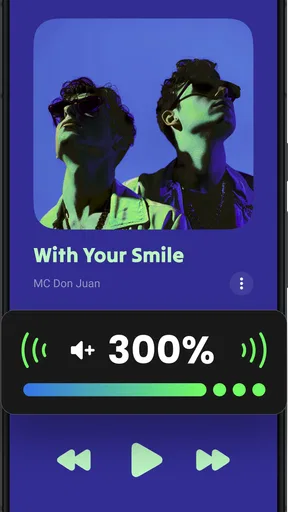
The floating player also has a clear use beyond looking clever: it can keep playback controls available while you do something else on the phone. For example, when I’m following a recipe or checking a message during a playlist, a compact control can save me from repeatedly returning to the full music screen. If you prefer an uncluttered display, though, a floating element may feel like one more thing competing for attention, so it is a feature to use when it helps rather than leave on by habit.
Choosing a library that stays manageable
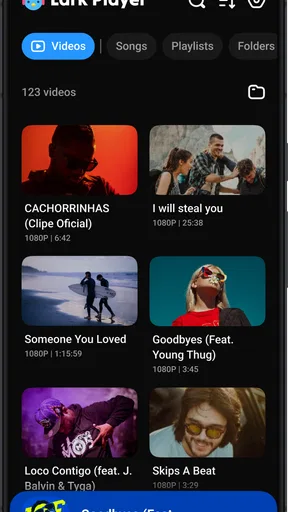
For a large personal collection, I’d spend a little time deciding how I want to browse before settling into everyday use. Album listening, a workout mix and a queue of individual favorites are different jobs, and a player is only convenient when the route to the music feels natural. The useful test is not whether every screen has an impressive feature, but whether I can get from opening the app to the right track without fuss.
The app’s lyrics and playback modes can also make a difference to how I use a track. Lyrics are handy when I want to follow along, while playback modes help when I’m in the mood to repeat a song or let a selection run. They are supporting tools rather than a substitute for a well-organized collection, and their usefulness depends on what is available for the music being played and how I like to listen.
How it compares, and who should choose it
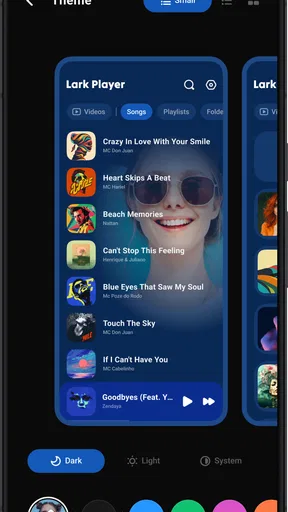
Compared with a simple built-in music player, Lark Player offers more room to shape the listening experience through themes, equalizer controls, lyrics and a floating player. Compared with a streaming app, its strength is the personal, offline collection rather than a broad online catalog. That puts it in a useful middle ground for someone who wants more than basic playback but does not need a streaming subscription to be the center of their music routine.
I’d recommend trying it if you already keep audio files on your phone, appreciate visual customization, or want playback controls that can stay accessible while multitasking. It is less compelling if you rely on curated online recommendations, expect new music to appear in a searchable catalog, or want one app to manage a cloud-based library across services. In those cases, a streaming-focused alternative is likely the better fit.
Getting Started with Lark Player
Right off the bat, Lark Player impresses with its sleek interface. Installing it is a breeze, and once you’re in, you’re greeted with a modern, intuitive layout that makes navigation a walk in the park. Whether you’re a tech guru or a newbie, you’ll find it easy to dive into your favorite tunes.
Features That Hit the Right Note
One of the standout features of Lark Player is its ability to support a wide range of audio formats. From MP3 to AAC, it covers all the bases. And if you love tweaking your sound, the built-in equalizer is a treat. You can adjust the bass, treble, and even create custom sound profiles to match your mood or the genre you’re into.
But what really adds the cherry on top is the floating music player. Yes, you heard that right! You can keep the tunes going while you multitask on your phone. It’s like having your personal DJ following you around wherever you go.
The Social Side of Music
I was pleasantly surprised by the social features embedded within the app. You can share your favorite tracks with friends, which is perfect for those times when you want to spread some musical joy. Plus, the app’s seamless integration with social media platforms makes sharing a breeze.
A Feast for the Eyes
Let’s not forget the visual aspect of Lark Player. The app offers a variety of themes, allowing you to customize the look according to your vibe. It’s refreshing to have an app that’s not only audibly pleasing but also visually appealing.
Performance and Usability
In terms of performance, Lark Player is a powerhouse. I’ve loaded it with countless tracks, and it hasn’t skipped a beat. The app runs smoothly, without those pesky lags that can ruin the listening experience. Plus, the battery consumption is pretty efficient, so you won’t find your phone dying on you halfway through your playlist.
Room for Improvement?
No app is perfect, and while Lark Player ticks a lot of boxes, there’s always room for improvement. Sometimes, the app’s recommendations can be a bit hit-or-miss. A little more refinement in this area could make discovering new music even more enjoyable.
Also, while the app is free, it does come with ads. They’re not overly intrusive, but if you’re someone who prefers an ad-free experience, you might want to consider the premium version.
On the practical side, I’d use the free version for a few ordinary listening sessions before deciding whether its ads bother me enough to pay. The app is free to download, with optional in-app purchases listed from $0.99 to $6.99 per item; that gives you a choice, but I wouldn’t assume a purchase is necessary just to try the basic player. If ads interrupt your preferred routine, weigh that friction against how often you use the app rather than paying automatically.
A realistic example is an offline commute: I’d queue a downloaded album before leaving, keep playback running while checking a travel message, and use the floating controls only when I need to skip a track. At home, I might switch to a theme that is easier on the eyes and make a small equalizer adjustment for my headphones. Those are modest conveniences, but together they can make a local collection feel less like a folder of files and more like a listening setup I can shape.
What to expect before making it your main player
Lark Player is made by Lark Player Studio - Music, MP3 & Video Player, and its scale suggests it has broad appeal: it has a 4.6 average from around 5.2 million ratings and has passed 500 million installs. It is free, rated for Everyone, and has been available since June 24, 2016. Those figures are useful context, but they don’t guarantee that its layout or ad experience will suit every listener; I’d still judge it by how it handles the collection and habits I actually have.
One question people often have is whether the app is worthwhile without buying anything. For someone who wants a local music player and can live with ads, the free option is a sensible way to find out. Another is whether it replaces a streaming subscription: I wouldn’t count on it for that role. Its appeal is strongest when the music is already on your device, while streaming services are more convenient for browsing a changing online catalog and finding artists you haven’t saved.
I’d also be selective about using every extra at once. Themes are a visual preference, lyrics are useful when they match the track, and an equalizer is best adjusted for a particular listening setup. Trying one change at a time makes it easier to tell whether it actually improves the experience. If the app feels busy, returning to a simple theme and leaving sound settings neutral can keep the focus on the music.
There are reasonable cases for skipping it. If you want a minimal player with almost no interface choices, a built-in option may be less distracting. If recommendations and seamless access to a huge online library are central to your listening, a streaming-first app is a better match. And if you dislike ads, the free experience may become tiresome even when the playback tools work well.
Overall, Lark Player: Music Player & MP3 is a solid choice for anyone looking to elevate their music listening experience. With its user-friendly interface, robust features, and social elements, it brings something unique to the table. Whether you’re chilling at home or on the go, this app is a trusty companion for all your musical adventures.
Privacy and Permissions
See what permissions an app requests and how it handles your data.
- Photos/Media/Files
- read the contents of your USB storage, modify or delete the contents of your USB storage
- Storage
- read the contents of your USB storage, modify or delete the contents of your USB storage
- Wi-Fi connection information
- view Wi-Fi connections
- Other
- view network connections, disable your screen lock, expand/collapse status bar, full network access, change your audio settings, run at startup, reorder running apps, draw over other apps, control vibration, prevent device from sleeping, modify system settings, install shortcuts, uninstall shortcuts
Verdict
Strengths of Lark Player:Music Player & MP3
- User-friendly interface, easy navigation.
- Supports various audio formats.
- Customizable equalizer settings.
- Offline music playback available.
- Minimal battery consumption.
Limitations of Lark Player:Music Player & MP3
- Contains ads in the free version.
- Limited features without premium.
- Occasional playback glitches.
- No option for lyrics display.
- In-app purchases can be costly.
Similar Picks in This Category
View All
YouTube Music
Google LLC4.4

Samsung Music
Samsung Electronics Co., Ltd.3.8

Spotify: Music and Podcasts
Spotify AB4.3

JioSaavn - Music & Podcasts
Saavn Media Limited4.3

StarMaker: Sing Karaoke Songs
SKYWORK AI PTE. LTD.4.3

Shazam: Find Music & Concerts
Apple Inc.4.8
You May Also Like
View All
Frequently Asked Questions
What features does Lark Player offer for music playback?
Lark Player offers a wide range of features for music playback, including a powerful equalizer with preset modes, lyrics synchronization, and customizable themes. It also supports various audio formats and allows users to create and manage playlists easily. The app enhances the listening experience with features like floating player and sleep timer.
Is Lark Player free to use, or does it require a subscription?
Lark Player is free to download and use, providing a robust set of features without a subscription. However, it does offer in-app purchases for additional features and an ad-free experience. Users can choose to upgrade if they want to enhance their music listening experience with premium options.
Does Lark Player support offline music playback?
Yes, Lark Player supports offline music playback, allowing users to listen to their favorite tracks without an internet connection. You can play songs stored locally on your device, making it convenient for listening on the go or in areas with limited connectivity. Simply add your downloaded music to the app.
What audio formats are compatible with Lark Player?
Lark Player is compatible with a wide range of audio formats, including MP3, AAC, FLAC, WAV, and more. This versatility ensures that users can enjoy their entire music library without worrying about format compatibility. The app's player is designed to provide high-quality sound across all supported formats.
How user-friendly is the interface of Lark Player?
Lark Player features a user-friendly interface that is intuitive and easy to navigate. Its clean design allows users to quickly access music controls, playlists, and settings. The customizable themes and straightforward layout make the app accessible to both new users and seasoned music enthusiasts, enhancing overall usability.
